Table of Contents
- Direct Answer
- Before You Start
- Step 1: Find Your Property
- Step 2: Review the County Value
- Step 3: Prepare Evidence
- Step 4: Submit the Grievance in AROW
- Step 4.1: Register or Log In
- Step 4.2: Choose a Filing Path
- Step 4.3: Select the Correct Property Type and Form
- Step 4.4: Complete Part A — Property Information
- Part A Checklist
- Step 4.5: Complete Part B — Market Value Estimate
- Step 4.6: Complete Part C — Contact Information
- Step 4.7: Complete Part D — Property Value Influences
- Step 4.8: Complete Part E — Comparable Sales
- Step 4.9: Attach Supporting Evidence
- Step 4.10 Submit the Application
- Step 5: Save Confirmation and Monitor Status
- Common AROW Mistakes
- DIY AROW Filing Checklist
- How FairValue Helps Before AROW Filing
- Final Takeaway
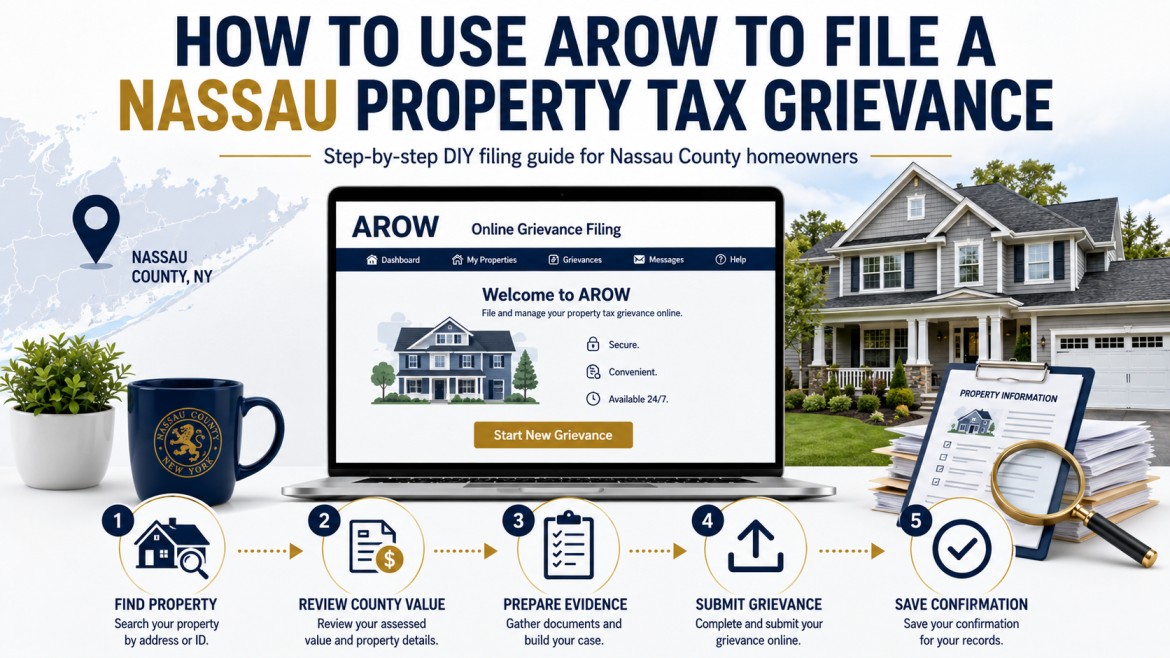
AROW, short for Assessment Review on the Web, is Nassau County’s online system for filing a property assessment grievance with the Assessment Review Commission, commonly called ARC.
Homeowners can use AROW to file a grievance, enter a requested market value, identify comparable sales, add supporting facts, and upload evidence during the filing window.
This guide explains the DIY filing process clearly, with one important caution:
Government portals change. Use official ARC videos as filing references, but avoid relying only on outdated screenshots. The best approach is to understand the filing sequence, required information, and evidence logic.
Useful official references:
- ARC AROW overview video — official Nassau County video
- ARC detailed AROW filing video — official Nassau County video
Direct Answer
AROW is Nassau County’s online grievance filing system. Homeowners can use it to submit a property tax grievance and upload supporting evidence during the active filing period.
A strong DIY filing usually includes:
- Correct property identification;
- Correct assessment year;
- Owner and contact information;
- A lower requested market value;
- Comparable sales, if available;
- Assessment equity evidence;
- Property condition documentation;
- Supporting attachments;
- Saved confirmation records.
The portal is only the submission tool. The strength of the filing depends on the evidence behind it.
Before You Start
Before logging into AROW, prepare the information and documents you will need.
Basic Property Information
Gather:
- Property address;
- Section-Block-Lot, often called SBL;
- Parcel ID, if available;
- Owner name;
- Mailing address;
- Email address;
- Phone number;
- Property type;
- Assessment year being challenged.
Evidence Files
Prepare evidence before starting the form.
Useful files include:
- Comparable sales report;
- Assessment equity comparison;
- Property condition photos;
- Contractor estimates;
- Repair invoices;
- Inspection report;
- Recent closing statement;
- Appraisal, if available;
- Written evidence summary.
AROW may time out after about 20 minutes of inactivity, so it is safer to prepare evidence before logging in. The ARC transcript recommends completing the required sections first, submitting the appeal, and then returning to add optional information or attachments if needed.
Step 1: Find Your Property
The first step is to identify the correct property in AROW.
You may search by:
- Property address;
- Section-Block-Lot;
- Parcel ID.
When searching by address, users should avoid entering the street suffix, such as Street, Avenue, or Road. Search the street name, confirm the correct property, and then select the Parcel ID shown in the result.
What to Verify
| Field | Why It Matters |
|---|---|
| Address | Confirms you selected the correct property. |
| Parcel ID / SBL | Prevents filing against the wrong parcel. |
| Owner Name | Confirms the application is tied to the correct owner. |
| Property Type | Helps determine the correct filing form. |
| Assessment Year | Confirms you are challenging the correct tentative roll. |
Do not rush this step. A simple parcel-selection error can create filing confusion later.
Step 2: Review the County Value
Before filing, identify the value you are challenging.
Review:
- Tentative assessed value;
- County market value or implied market value;
- Property class;
- Exemptions;
- Property characteristics;
- Assessment history.
The correct filing question is not:
“Are my taxes too high?”
The correct filing question is:
“Is Nassau County’s assessed value or implied market value higher than the evidence supports?”
A grievance challenges the assessment. It does not directly challenge school budgets, municipal tax rates, or special district charges.
Step 3: Prepare Evidence
A Nassau property tax grievance should be based on evidence, not emotion.
Strong evidence may include:
- Recent comparable sales;
- Assessment equity comparisons;
- Property condition documentation;
- Recent purchase price;
- Appraisal or inspection records;
- Contractor estimates;
- Evidence of incorrect County records.
Comparable Sales
Comparable sales are recent nearby sales of similar homes.
Good comparable sales are:
- Recent;
- Nearby;
- Similar in size;
- Similar in style;
- Similar in lot size;
- Similar in condition;
- Located in the same or similar market area.
Assessment Equity
Assessment equity compares your property to similar nearby properties.
The question is:
Are similar homes assessed lower than yours?
This is useful when nearby homes with similar size, style, and location have lower assessments.
Property Condition
Condition evidence can support a lower value if defects reduce market value.
Examples include:
- Roof deterioration;
- Foundation issues;
- Water damage;
- Structural settlement;
- Outdated systems;
- Major deferred maintenance.
Condition claims should be supported by photos, estimates, invoices, inspection reports, or other records.
Recent Purchase
A recent purchase price may help if:
- The sale was recent;
- The transaction was arm’s-length;
- The property was exposed to the open market;
- The sale price is below the County’s implied value.
A recent purchase may not help if you paid more than the County’s value or if the sale was unusual.
Step 4: Submit the Grievance in AROW
This is the actual filing step.
The County’s official videos are useful references, especially the detailed AROW walkthrough and the shorter overview video. It explains how users register, file an appeal, use Sales Locator, add attachments, make changes, and confirm submission.
Recommended references:
Because AROW screens may change, the steps below focus on the filing logic rather than exact button placement.
Step 4.1: Register or Log In
If this is your first time using AROW, register for an ARC account.
If you already have an account, log in with your user ID and password.
The transcript states that first-time users can register with ARC, while returning users can use the Login tab to access the AROW homepage.
After logging in, you should reach the AROW homepage.
Step 4.2: Choose a Filing Path
AROW generally provides two practical paths:
| Filing Path | Best For |
|---|---|
| File an Appeal | Homeowners who already prepared their own evidence packet. |
| File an Appeal Using Sales Locator | Homeowners who want to use AROW’s built-in comparable sales tool. |
Both paths can work.
If you already have a strong evidence packet, the standard appeal path is usually more direct.
If you want help finding sales, Sales Locator can be useful as a starting point.
Step 4.3: Select the Correct Property Type and Form
From the AROW homepage, choose the option to file an appeal.
The official video explains that users select a property type from a drop-down list and that Form AR1 is used for value claims involving one-, two-, or three-family homes.
For most Nassau homeowners, the relevant path is a residential value claim.
Before continuing, confirm:
- Property type;
- Parcel ID;
- Owner information;
- Assessment year.
Step 4.4: Complete Part A — Property Information
Part A identifies the property and owner.
You may need to enter or confirm:
- Parcel ID;
- Property address;
- Applicant name;
- Other owner names;
- Form type.
If the property has multiple owners, list the other owners where applicable. ARC customer service can only discuss the appeal with people listed on the application.
Part A Checklist
- Correct parcel selected;
- Correct address shown;
- Owner name is accurate;
- Co-owner names added, if applicable;
- Correct form type selected.
Step 4.5: Complete Part B — Market Value Estimate
Part B is one of the most important sections.
This is where you enter your estimate of the property’s full market value.
Note that:
- The value should be entered without a dollar sign;
- The value should not include decimals;
- The requested market value must be below the tentative market value for ARC to have jurisdiction;
- ARC cannot reduce the tentative market value below the amount requested in Part B.
In plain English:
Enter the lower market value your evidence supports.
Example:
| Item | Example |
|---|---|
| County tentative market value | $850,000 |
| Evidence-supported market value | $760,000 |
| Part B entry | 760000 |
Do not enter a random number. Tie the value to your evidence.
Step 4.6: Complete Part C — Contact Information
Part C confirms how ARC can contact you.
Review:
- Mailing address;
- Email address;
- Phone number;
- Correspondence preference.
ARC offers electronic or paper notifications, and that electronic correspondence is the default and recommended option because notices are delivered faster and stored in AROW.
For most DIY filers, electronic correspondence is easier to track.
Step 4.7: Complete Part D — Property Value Influences
Part D is where you can explain property-specific issues that affect value.
Use this section for facts such as:
- Poor condition;
- Roof damage;
- Foundation issues;
- Water intrusion;
- Incorrect property data;
- Location disadvantages;
- Functional layout problems;
- Other value-reducing facts.
Keep the explanation factual and concise.
Weak explanation:
My taxes are too high.
Better explanation:
The property has documented roof deterioration and water intrusion. Photos and contractor estimates are attached. These conditions reduce market value compared with renovated nearby sales.
Part D should summarize the issue. The proof should be uploaded as attachments.
Step 4.8: Complete Part E — Comparable Sales (Skip This Step)
Because your FairValue Tax Evidence Report already contains a fully developed, curated comparable sales analysis, you can save time by skipping the manual entry in Part E.
There is no need to type out individual property addresses, sale dates, or sale prices directly into the AROW portal. Instead, you will simply upload your complete FairValue Evidence Report in the next step. ARC reviewers will refer to your attached report for the comparable sales data.
Skip AROW’s Sales Locator Tool
AROW includes a built-in Sales Locator tool, but you should completely bypass it.
Relying on the County's automated tool can actually weaken your case because:
- It often suggests sales that are not the most recent or most similar;
- It cannot evaluate interior condition, renovation quality, or distinct neighborhood boundaries;
- The ARC explicitly states the tool is not an appraisal and not an official opinion of value.
By skipping this section and uploading your FairValue Evidence Report in Step 4.9, you save time and ensure the County reviews a targeted, highly accurate, and evidence-based argument rather than an automated list.
Step 4.9: Attach Supporting Evidence
Supporting evidence should be submitted as attachments.
After submission, users can add attachments to an existing appeal, including appraisals, photos, or written documents with additional information that did not fit in Part D. It also notes that video attachments are not permitted.
Recommended Attachments
| Attachment | Purpose |
|---|---|
| Comparable Sales Report | Shows market evidence below County value. |
| Assessment Equity Report | Shows similar nearby homes assessed lower. |
| Property Condition Photos | Documents visible defects. |
| Contractor Estimates | Quantifies repair costs. |
| Inspection Report | Supports condition or structural claims. |
| Appraisal | Provides third-party valuation support. |
| Closing Statement | Supports recent purchase price evidence. |
| Written Evidence Summary | Explains the logic of the grievance. |
Use clear file names.
Examples:
Comparable-Sales-Report.pdfAssessment-Equity-Comparison.pdfProperty-Condition-Photos.pdfRoof-Repair-Estimate.pdfRecent-Closing-Statement.pdfEvidence-Summary.pdf
Step 4.10 Submit the Application
When the required fields are complete, submit the application.
If required information is missing, AROW displays red error messages. After successful submission, the system shows an on-screen confirmation, sends a confirmation email, and allows users to view the application number in the appeal filing status area.
Before closing the browser, save:
- Confirmation number;
- Application number;
- Submission timestamp;
- Confirmation email;
- PDF or print copy of the application;
- Copies of uploaded attachments.
This is your proof of filing.
Step 5: Save Confirmation and Monitor Status
After filing, do not assume the process is complete until you save your records.
Keep a folder with:
- Submitted application;
- Confirmation email;
- Application number;
- Uploaded attachments;
- Evidence packet;
- Notes on requested value;
- Any later correspondence from ARC.
Users can view filing status through AROW and make changes during the filing period. After the deadline, changes or new documentation must be submitted by regular mail.
Common AROW Mistakes
Mistake 1: Filing for the Wrong Year
Nassau assessment years can confuse homeowners.
Always confirm the assessment year shown in AROW before submitting.
Mistake 2: Waiting Until the Deadline
Do not wait until the last filing day.
Last-minute problems can include:
- Login issues;
- Portal slowdown;
- Missing documents;
- File upload errors;
- Confusion over parcel ID;
- Session timeout.
File early enough to fix mistakes.
Mistake 3: Entering an Unsupported Value
The requested market value should be tied to evidence.
Do not enter a number just because it sounds favorable.
Use:
- Comparable sales;
- Assessment equity;
- Recent purchase price;
- Property condition;
- Documentation.
Mistake 4: Relying Only on Sales Locator
Sales Locator is useful, but limited.
It may not select the best sales. It may not reflect your property’s condition. It does not replace a full evidence strategy.
Use it as a starting point, not the entire case.
Mistake 5: Forgetting Attachments
A grievance with no supporting evidence is easier to deny.
Before finishing, verify that attachments were uploaded successfully.
Mistake 6: Using Weak Evidence
Avoid relying only on:
- “My taxes are too high”;
- Unsupported online estimates;
- Old sales;
- Distant sales;
- Different property types;
- Emotional explanations.
A strong filing explains why the County’s value is too high.
DIY AROW Filing Checklist
Before submitting, confirm:
- Correct property selected;
- Correct parcel ID or SBL;
- Correct assessment year;
- Owner information is accurate;
- Requested market value is below the County value;
- Requested value is supported by evidence;
- Comparable sales are relevant;
- Assessment equity is reviewed;
- Property condition issues are documented;
- Attachments are uploaded;
- Confirmation is saved.
How FairValue Helps Before AROW Filing
FairValue helps homeowners prepare before entering AROW.
The goal is not just to file a form.
The goal is to file a structured valuation argument.
FairValue organizes the evidence this way:
| Step | Purpose |
|---|---|
| County Value Review | Identify the value being challenged. |
| Market Evidence | Compare against recent comparable sales. |
| Equity Evidence | Compare against similar nearby assessments. |
| Property Facts | Add condition, purchase, or record-specific details. |
| Filing Packet | Prepare a clean document for upload. |
This helps homeowners enter AROW with a complete evidence package instead of trying to build the argument inside the portal.
Final Takeaway
AROW makes it possible for Nassau County homeowners to file a property tax grievance online without hiring a representative.
But AROW is only the filing system.
The strength of the grievance depends on the evidence.
A strong DIY filing should:
- Select the correct property;
- Enter a lower value supported by evidence;
- Use relevant comparable sales;
- Consider assessment equity;
- Add condition documentation when relevant;
- Upload supporting attachments;
- Save confirmation records.
The Sales Locator tool can help, but it should not be the entire case.
Prepare the evidence first. Then use AROW to submit a clean, timely, well-supported grievance.