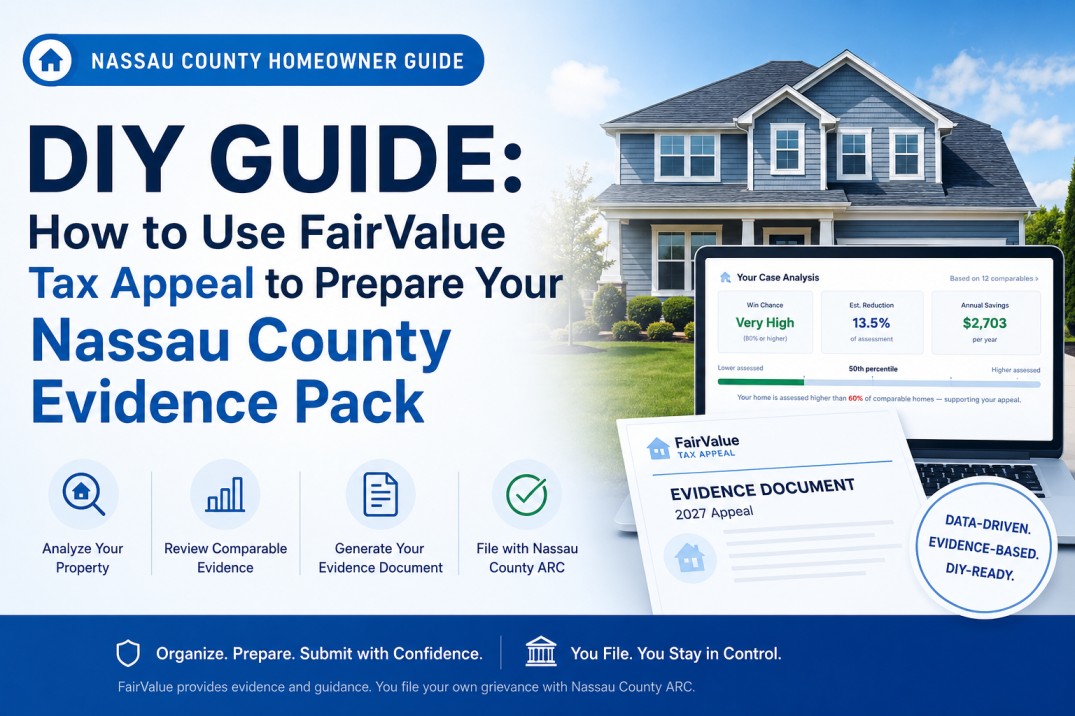
If you plan to file your Nassau County property-tax grievance yourself, FairValue Tax Appeal can help you organize information and supporting evidence before you submit through Nassau County ARC.
This guide walks through the DIY Evidence Pack process: searching for your property, reviewing the initial savings analysis, selecting the DIY option, reviewing comparable properties and nearby sales, adding factual property notes, generating an evidence document, and using that document as supporting material for your ARC filing.
For DIY pricing plan, FairValue does not submit the grievance for you. You remain responsible for reviewing your information, completing the ARC filing correctly, attaching supporting materials as appropriate, and filing before the applicable deadline. The DIY Evidence Pack can help make the preparation process more organized by bringing together property data, comparable-property analysis, prior appeal signals when available, and a draft evidence document tailored to your property.
Table of Contents
- Search Your Property
- Review Your Savings Analysis
- Claim Your Tax Appeal and Sign In
- Review Your Case Analysis and Choose a Plan
- Select the DIY Evidence Pack and Complete Checkout
- Open Your Evidence Pack
- Review Your Evidence Pack and Generate Your Evidence Document
- Save or Print Your Evidence Document
- Use the Requested Value When Completing Your ARC Filing
- File Your Grievance Through Nassau County ARC
- Keep Your Appeal Records
Step 1: Search Your Property
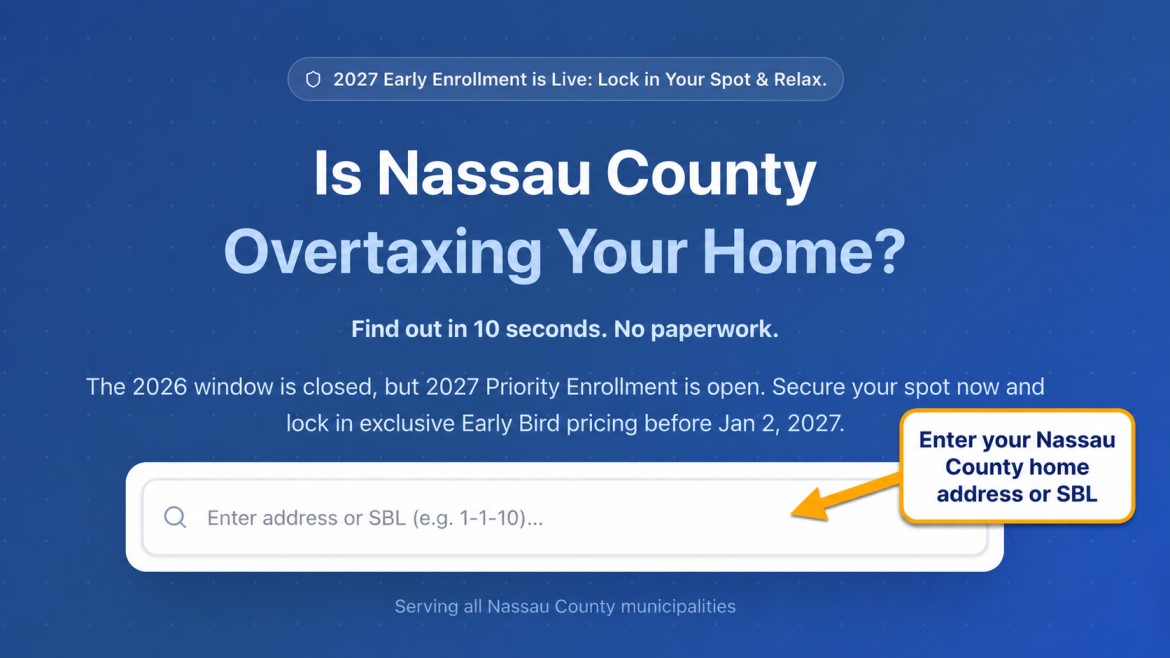
Start on the FairValue Tax Appeal homepage and enter your Nassau County home address or SBL, meaning Section–Block–Lot number, in the search box.
FairValue will locate the available property record and begin preparing an initial property-tax appeal analysis using relevant county assessment data, property information, comparable-property data, and other available market and appeal indicators.
This initial review helps you decide whether your property may be worth a closer look before you choose a plan or begin preparing an appeal.
Screenshot: Enter your Nassau County property address or SBL
Step 2: Review Your Savings Analysis
After searching for your property, FairValue displays a Savings Analysis summarizing the initial evidence review.
Start by reviewing the estimated annual tax savings. This is an estimate of the potential yearly savings if the property’s assessment were reduced to a level supported by the available evidence. It is not a guarantee of a reduction or a final tax calculation.
The analysis may include:
- Estimated Annual Tax Savings — the projected annual tax impact of a potential assessment reduction.
- County Market Value — the county’s current estimated market value used as the starting point for the review.
- FairValue Estimate — FairValue’s evidence-based estimate of the property’s supported market value.
- Win Probability — a model-based indication of how strongly the available data may support a review. It is not a guarantee of an ARC outcome.
- Tax Savings Breakdown — a comparison of estimated current taxes, projected taxes after a possible reduction, and estimated annual savings.
- Prior Appeal Benchmark — when prior finalized appeal information is available, a comparison between earlier results and the current analysis.
- Comparable Properties — an initial preview of similar nearby homes that may support an equity-based argument that the property is assessed higher than comparable homes.
A meaningful gap between the county’s market value and the FairValue Estimate, along with lower-assessed comparable properties, may indicate that the property is worth reviewing further.
At this stage, the comparable-property section is only a preview. The full comparable evidence, property record, and deeper appeal analysis become available after selecting a plan.
Screenshot: Savings Analysis preview
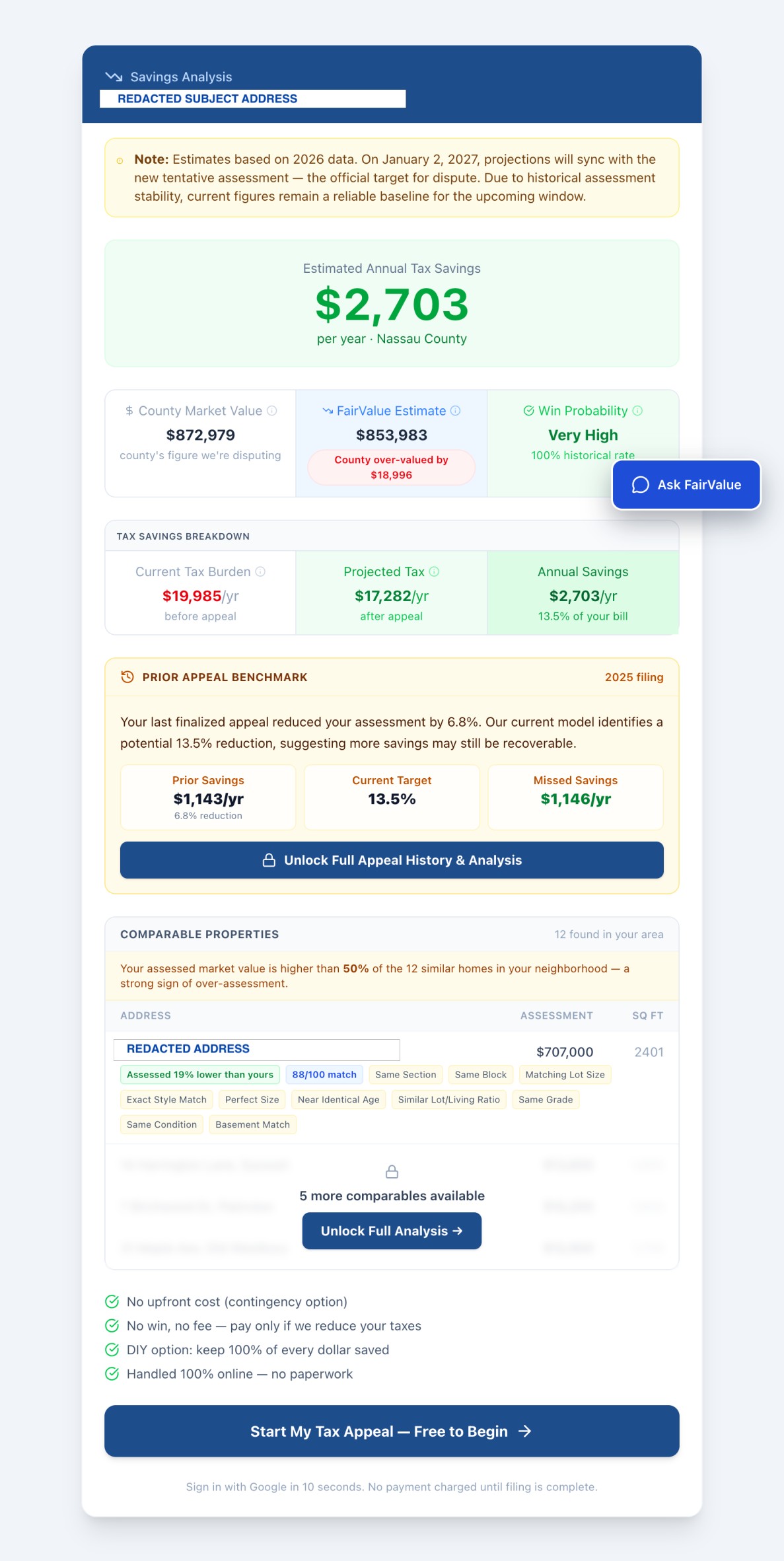
Privacy note: The subject-property address and the address of the top comparable property have been redacted in this screenshot.
Step 3: Claim Your Tax Appeal and Sign In
When you are ready to continue, click:
Start My Tax Appeal — Free to Begin
FairValue will then ask you to claim your tax appeal and sign in so your property review can be saved securely to your account.
You can continue in either of two ways:
- Select Continue with Google
- Enter your email address and click Send link to receive a secure sign-in link
Signing in allows FairValue to save your property, connect it to your dashboard, and let you return later to review your analysis, choose a plan, and generate your evidence materials.
Starting an appeal is free. You are not charged simply for signing in or saving your property review.
Screenshot: Claim your tax appeal and sign in

Step 4: Review Your Case Analysis and Choose a Plan
After signing in, FairValue takes you to the Review & Checkout page for your property.
This page brings together the main parts of your initial appeal review, including:
- Tentative Market Value Assessed by County — the county value currently being challenged.
- Your Case Analysis — including FairValue’s estimated win chance, estimated reduction percentage, and projected annual savings.
- Comparable Properties — nearby homes that may be assessed lower than your property and may support an equity-based appeal argument.
- Appeal History — prior finalized appeal outcomes, when available, and how the current target compares with prior reductions.
- Property Record — available parcel, school district, building, tax-history, and property-characteristic information.
- Choose Your Plan — the available service options for moving forward with your appeal.
Review the information carefully before choosing a plan. Look for evidence that your property may be assessed above comparable homes, such as a meaningful difference between your assessment and similar nearby properties, a supported reduction target, or favorable prior appeal history.
Some information may be shown as part of the free initial review, while deeper evidence, details of additional comparables, full appeal-strategy materials, or downloadable evidence documents may require selecting a paid plan.
Screenshot: Review & Checkout page

Step 5: Select the DIY Evidence Pack and Complete Checkout
On the Review & Checkout page, choose the DIY Evidence Pack option if you plan to file your Nassau County grievance yourself.
The DIY Evidence Pack is designed for homeowners who want to prepare and submit their own grievance while using FairValue’s property analysis, comparable-property review, and evidence-document tools to organize their supporting materials.
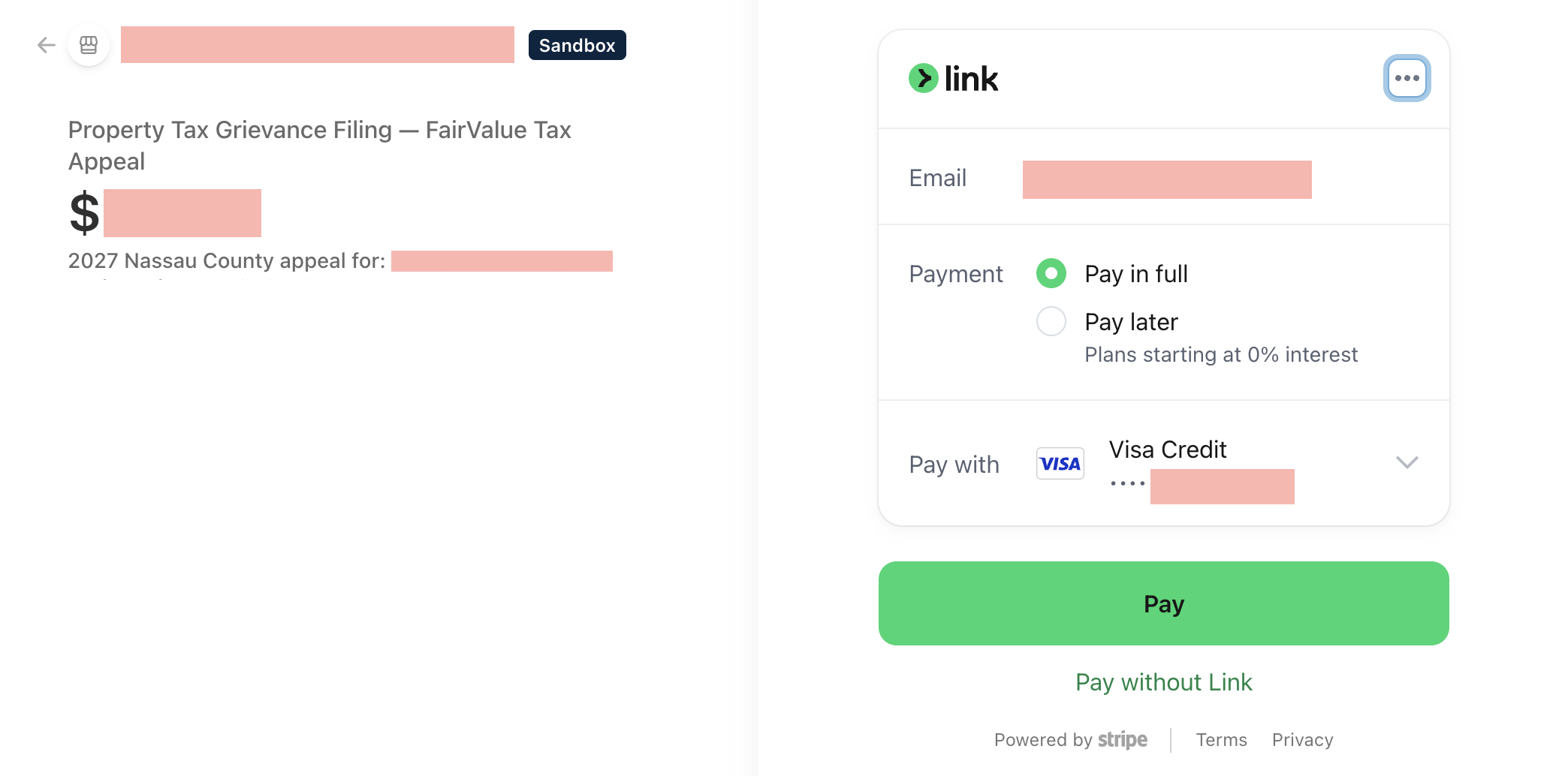
After selecting the DIY option, continue to secure checkout through Stripe.
At checkout, review:
- The selected FairValue service
- The filing year
- The property associated with the purchase
- The total price
- Your payment method
Then complete payment to unlock the DIY Evidence Pack and begin preparing your evidence materials.
Do not enter payment information unless you have confirmed that the property, filing year, selected plan, and price are correct.
Screenshot: Secure checkout for the DIY Evidence Pack
Step 6: Open Your Evidence Pack
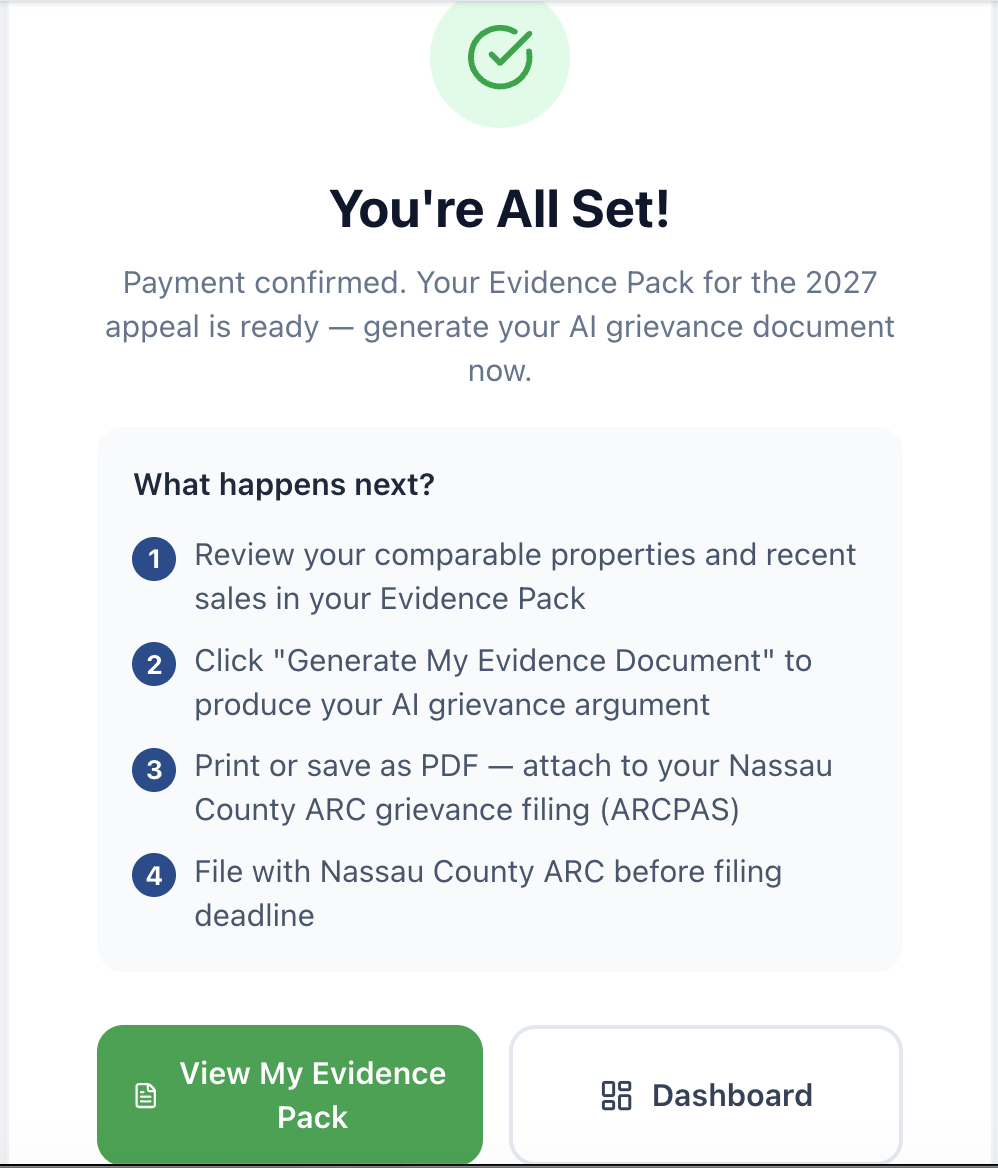
After payment is confirmed, FairValue will show a confirmation page stating that your Evidence Pack is ready for your 2027 appeal.
The page also outlines the next steps:
- Review the comparable properties and recent nearby sales included in your Evidence Pack.
- Generate your evidence document.
- Print or save the document as a PDF for use with your Nassau County ARC grievance filing.
- Complete your ARC filing before the applicable deadline.
To continue immediately, click:
View My Evidence Pack
You can also click Dashboard to return to your FairValue account and access the appeal later.
Screenshot: Payment confirmation and Evidence Pack access
Step 7: Review Your Evidence Pack and Generate Your Evidence Document
After payment, open your DIY Evidence Pack. This page brings together the property information and evidence FairValue has identified for your appeal.
Review each section before generating your document.
Review Your Property and Neighborhood Summary
At the top of the page, review the available information about your property and the surrounding neighborhood.
This may include property characteristics such as:
- Living area
- Lot size
- Year built
- Bedrooms and bathrooms
- Basement
- Condition
- Grade
The page may also compare your county fair market value with the median fair market value of nearby homes.
Review Your Top Comparable Properties
Next, review Your Top Comparable Properties.
These are nearby homes selected because they share important characteristics with your property, such as location, style, lot size, building size, bedroom and bathroom count, condition, grade, basement, or other relevant features.
Pay particular attention to:
- Whether the comparable homes appear genuinely similar to your property
- Their assessed values
- Their similarity-match indicators
- Whether they are assessed lower than your property
- Whether the supporting characteristics appear reasonable
These comparable properties may support an equity-based argument that your home is assessed higher than similar nearby homes.
Review Recent Nearby Comparable Sales
The Evidence Pack may also show recent nearby sales for context.
Review the sale price, sale date, location, and similarities to your property. In some cases, FairValue may indicate that nearby sales are shown for context only and will not be used as evidence because they do not support a lower value strongly enough.
When that happens, the stronger argument may come from lower-assessed comparable properties rather than recent sales.
Add Optional Notes About Your Property
Before generating your document, you may add factual notes about your property that public data may not fully capture.
Examples may include:
- Needed repairs or deferred maintenance
- An outdated kitchen, bathroom, roof, HVAC system, or other major component
- Structural or water-related issues
- Flooding, drainage, traffic, noise, or location disadvantages
- Other condition concerns that may affect value
Keep your notes specific, factual, and concise. Do not exaggerate or include information you cannot reasonably support.
Generate Your Evidence Document
Once you have reviewed the evidence and added any useful notes, click:
Generate My Evidence Document
FairValue will use the available property data, comparable-property evidence, recent-sales context, and any notes you provided to prepare your draft evidence document.
Screenshot: Review comparable evidence, add optional property notes, and generate your evidence document

Step 8: Save or Print Your Evidence Document
After FairValue finishes generating the document, review it carefully for accuracy.
When it is ready, use the available Print or Save PDF option to keep a copy for your records and for use with your Nassau County ARC filing.
Your evidence document is supporting material for your grievance. You are still responsible for reviewing the document, completing the ARC filing accurately, attaching or uploading materials as appropriate, and filing before the deadline.
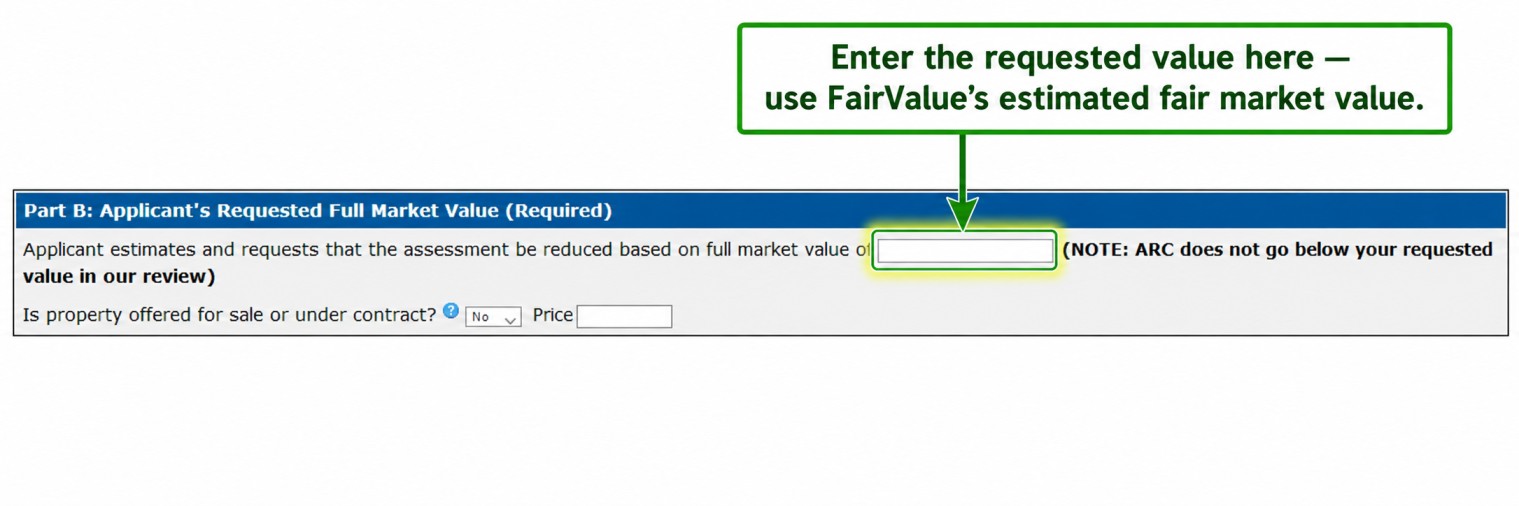
Step 9: Use the Requested Value When Completing Your ARC Filing
After you review and save your FairValue evidence document, use the requested value shown in the document when completing your Nassau County ARC grievance.
FairValue may provide guidance explaining where to enter that value in the ARC filing form. Read that guidance carefully and make sure you use the value consistently with the rest of your submission.
Before moving on, confirm that:
- The requested value matches the value shown in your FairValue evidence document.
- The property address and owner information are correct.
- The filing year is correct.
- Any other figures entered in the ARC form match the information you intend to submit.
FairValue provides supporting evidence and filing guidance, but you remain responsible for completing the ARC filing accurately.
Screenshot: Requested-value guidance in the evidence document
Step 10: File Your Grievance Through Nassau County ARC
The DIY Evidence Pack does not submit the grievance for you. You must complete and submit your own grievance through Nassau County ARC’s filing system.
Use your FairValue evidence document as supporting material for your submission. Follow the ARC filing instructions that apply to your property and filing year.
Before submitting, review the following:
- Property address and owner information
- Filing year
- Requested value
- Required ARC form fields
- Supporting evidence document and any other attachments
- Filing deadline
Save or print the confirmation page after you submit your grievance. It is your record that the filing was completed.
Official ARC Filing Videos
Step 11: Keep Your Appeal Records
Keep copies of all documents related to your grievance in one place.
Save:
- Your FairValue Evidence Pack and generated evidence document
- Your ARC filing confirmation
- Any forms or attachments you submitted
- Emails or notices from Nassau County ARC
- Any later decision notice or assessment-related correspondence
You can return to My Appeals in FairValue to access your saved case and evidence materials. Keep your own copies as well, especially after you submit the ARC filing.
Important Note
FairValue Tax Appeal helps homeowners organize data-driven evidence for a Nassau County property-tax grievance review.
The DIY Evidence Pack does not guarantee a reduction, does not submit the grievance for you, and does not replace your responsibility to complete the ARC filing accurately and on time.
FairValue Tax Appeal is not a law firm and does not provide legal advice.